Three Things to Know About YouTube Kids

It’s very easy to assume that YouTube Kids is a safe space for children - YouTube is a major platform, and it has ‘Kids’ right there in the name.

Unfortunately, that’s not always the case unless strict security settings are in place. As a former Googler - and mom - here’s three things that I wish more people knew about the platform.

1) Anyone - yes, ANYONE - can upload content that may be fed to YouTube Kids.

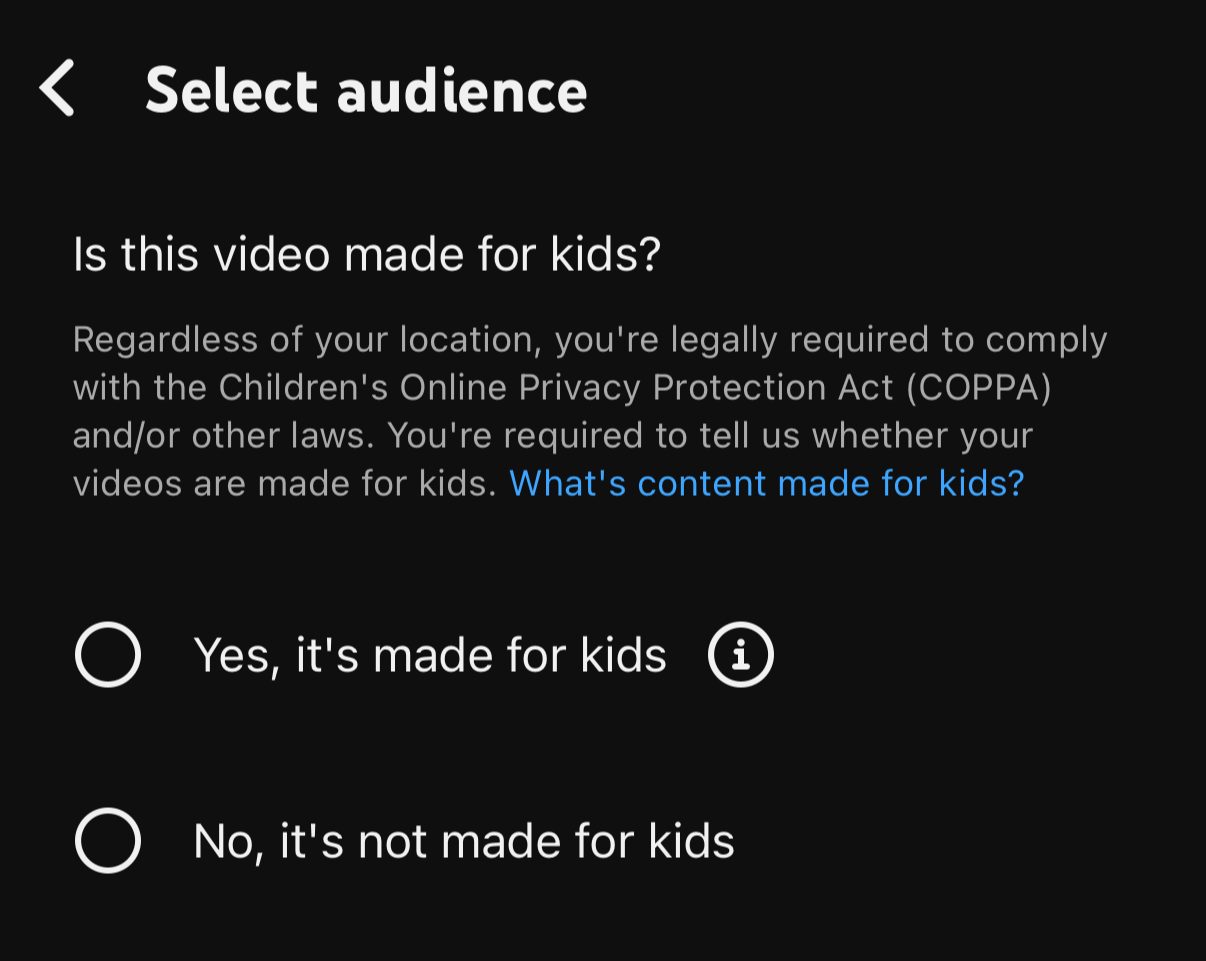
All you have to do for the algorithm to consider pushing a video to YouTube Kids is check a box that says that the content is intended for kids. That’s it. While there’s no guarantee that any video will get pushed to the platform, this is the only step that needs to occur on the creator’s side.

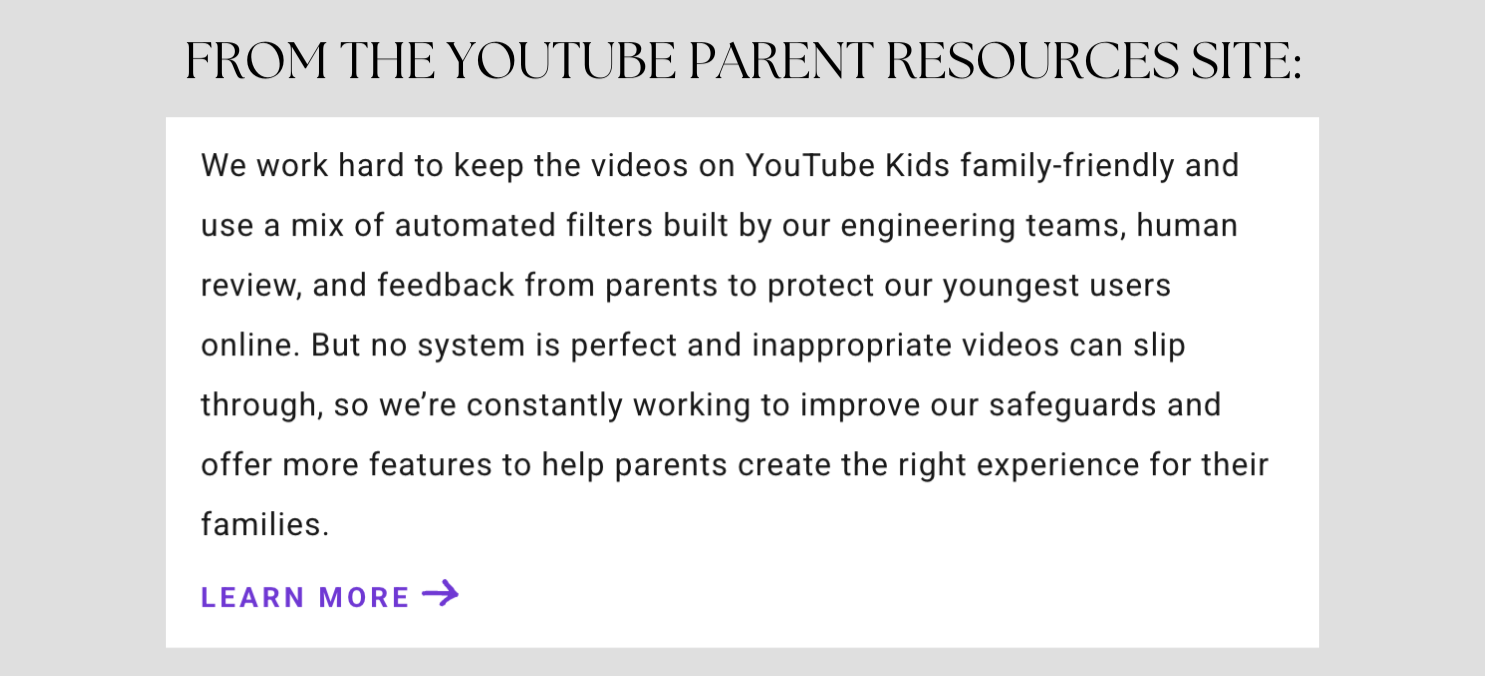
2) YouTube uses a mix of AI, human review and parental feedback to filter out inappropriate content. YouTube admits that it’s not a foolproof system.

Inappropriate content can - and does - slip through. If you do an Internet search for “inappropriate YouTube Kids videos” you’ll see some examples - from violent to sexual content. And without security measures, it’s unfortunately not uncommon. You may select an age range or a topic, but then the algorithm will start serving whatever videos it thinks will keep the child on the platform and engaged the longest.

AI can only do so much - and there simply aren’t enough humans at YouTube to catch all of the inappropriate content out there. YouTube even relies on parents to report inappropriate videos:

https://support.google.com/youtubekids/answer/6130562

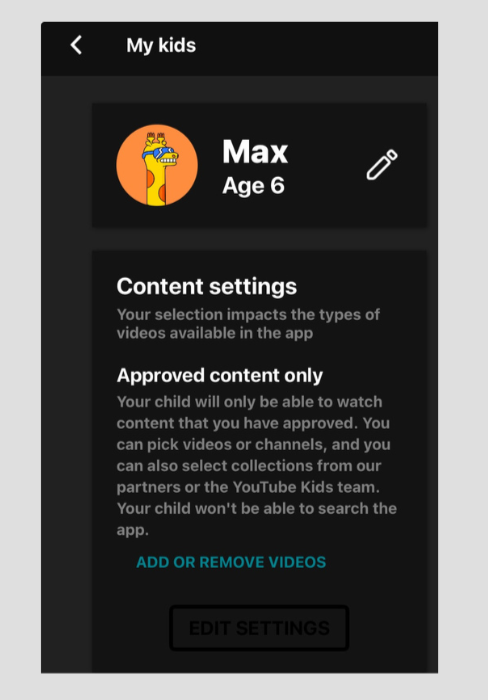
3) The safest way for a child to engage with the YouTube Kids app is for the parent to only allow “Approved Content.”

This means that your child will not get fed any videos other than what you’ve specifically approved. Here’s how to set this up:

To access the YouTube Kids content settings:

• Click the settings wheel in the upper right corner

• Enter your passcode

• You may need to sign in with your own Google account

• Click on your child’s name/icon

You’ll see “Content Settings.” This is where you can choose how stringent you’d like your settings to be.

With this security tweak, your kids will be more protected from inappropriate content. For more digital security tips, check out my resources - including my ebook Safe Kids, Smart Screens - and subscribe to get my blog posts with simple tips sent right to your inbox.

Overstimulated? Try Grayscale Mode on iOS

‘Tis the season - for holiday planning, kids out of school, dogs barking at delivery people, and so many other forms of stimulation. It’s no wonder this is one of my go-to t-shirts - with or without the Snoopy-dressed-as-Santa stickers.

While some stimuli is more audibly obvious, screens can be incredibly stimulating. They impact our brains in all kinds of ways - including increasing dopamine and activating the reward center of our brain. The colors, the sounds, the payoff of a hilarious or thought-provoking reel - it’s no wonder so many of us (myself included) can have a hard time putting the phone down.

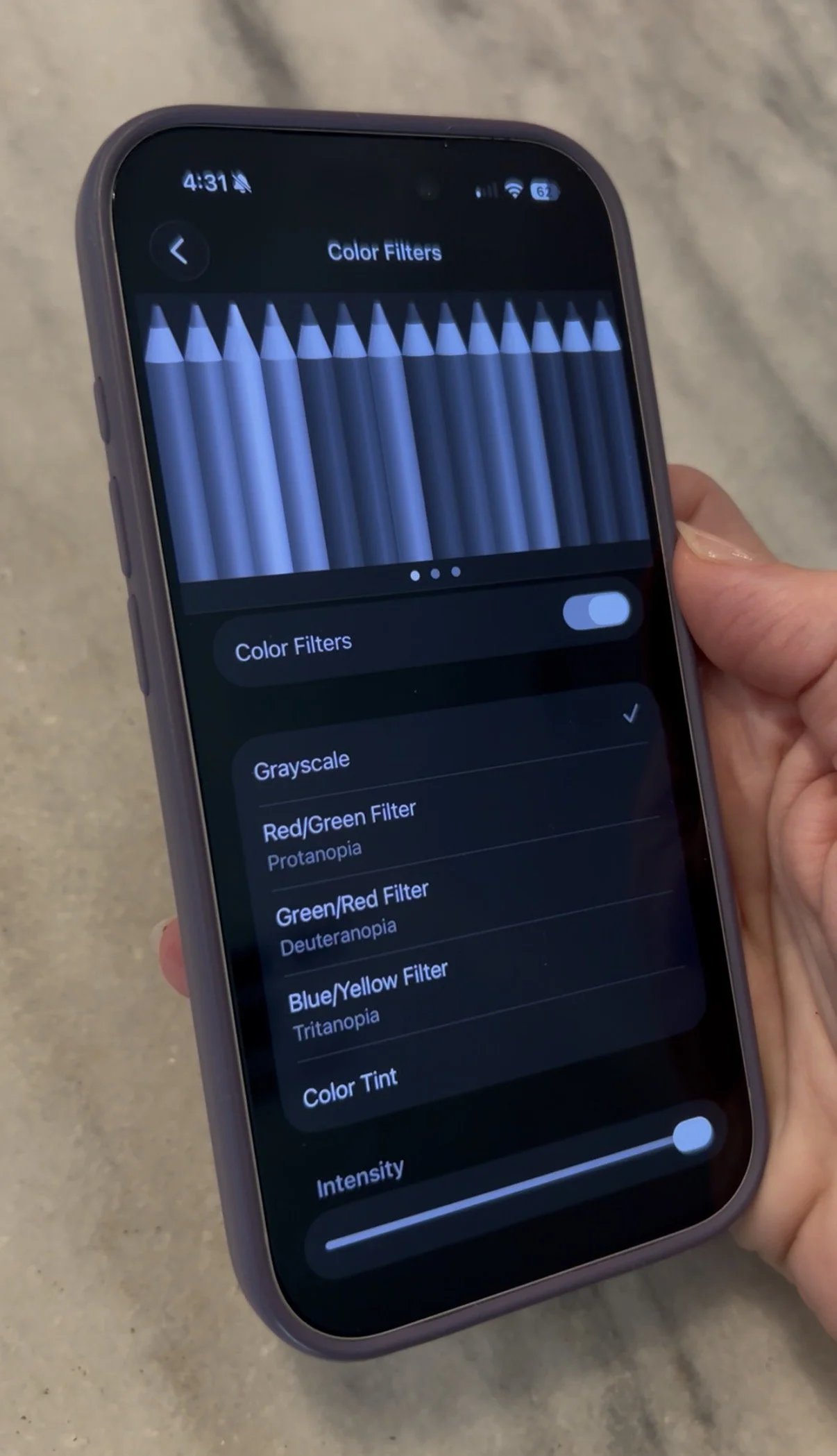
If you have an iPhone, I wanted to share one settings change that can actually make a difference. It’s called Grayscale Mode, under Color Filters. It keeps your phone completely functional, while removing the stimulating, bright colors by switching the display to grayscale. On top of reducing stimulation it can reduce eye strain, help with screen addiction, and save battery life.

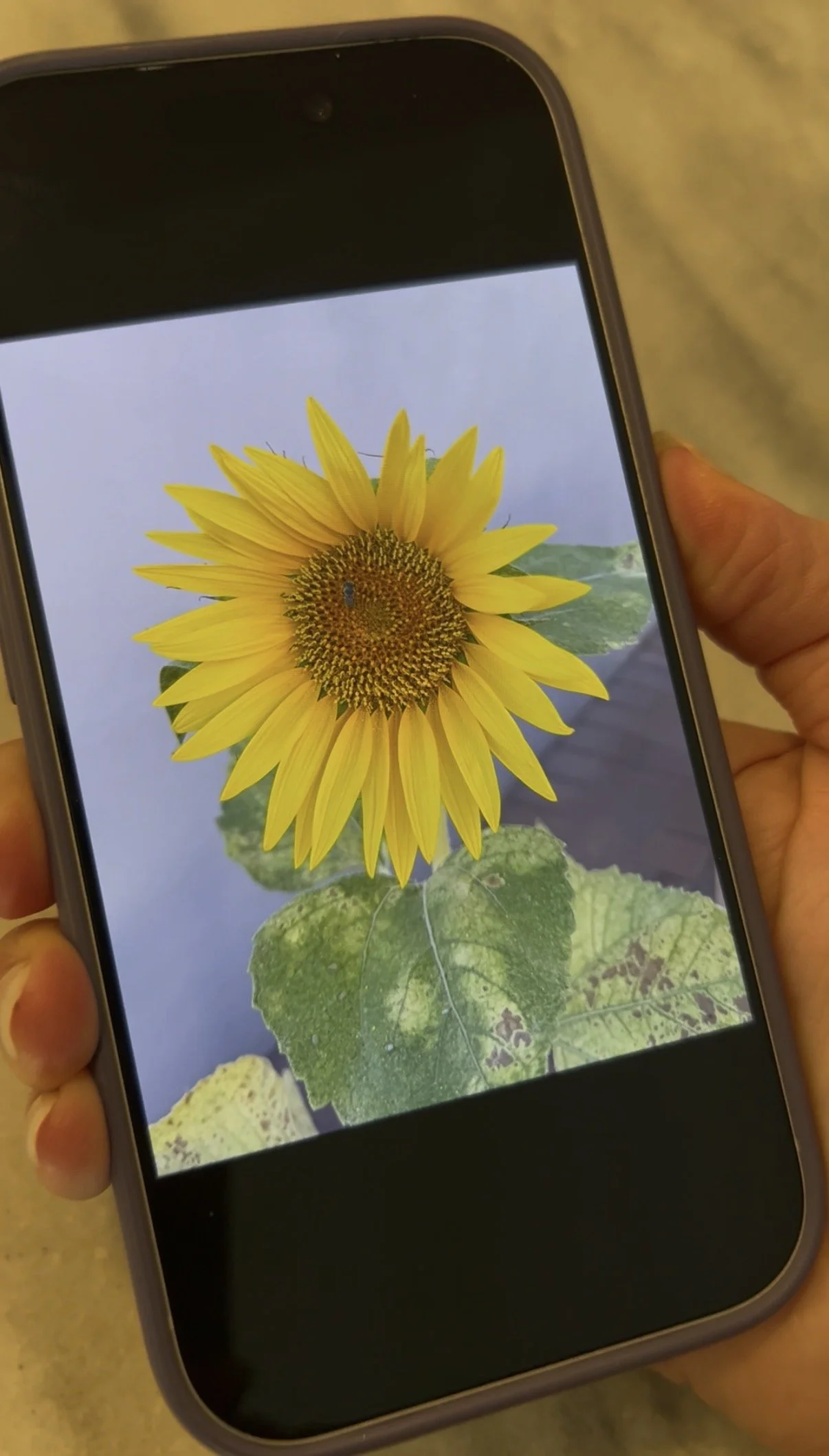
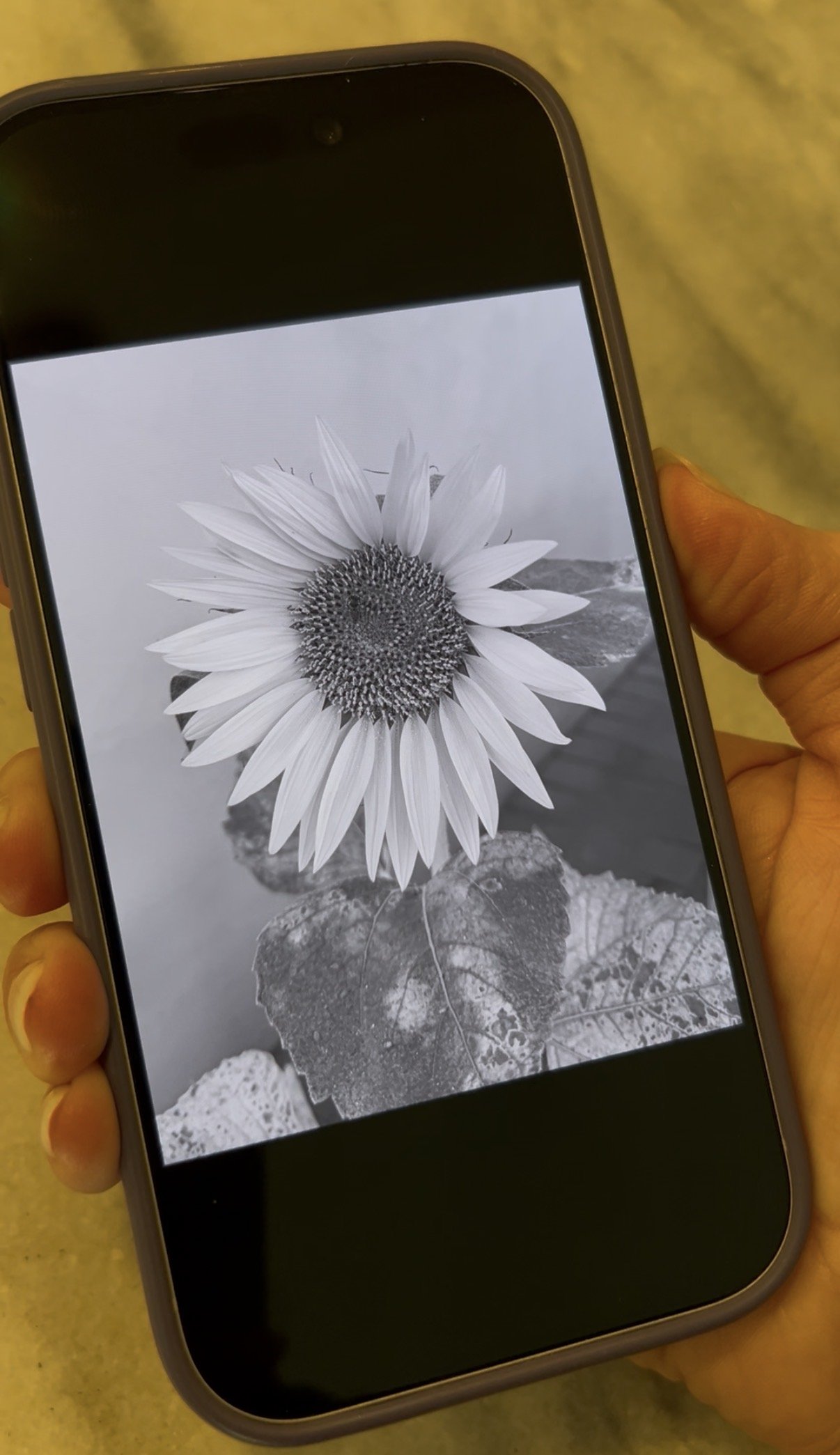
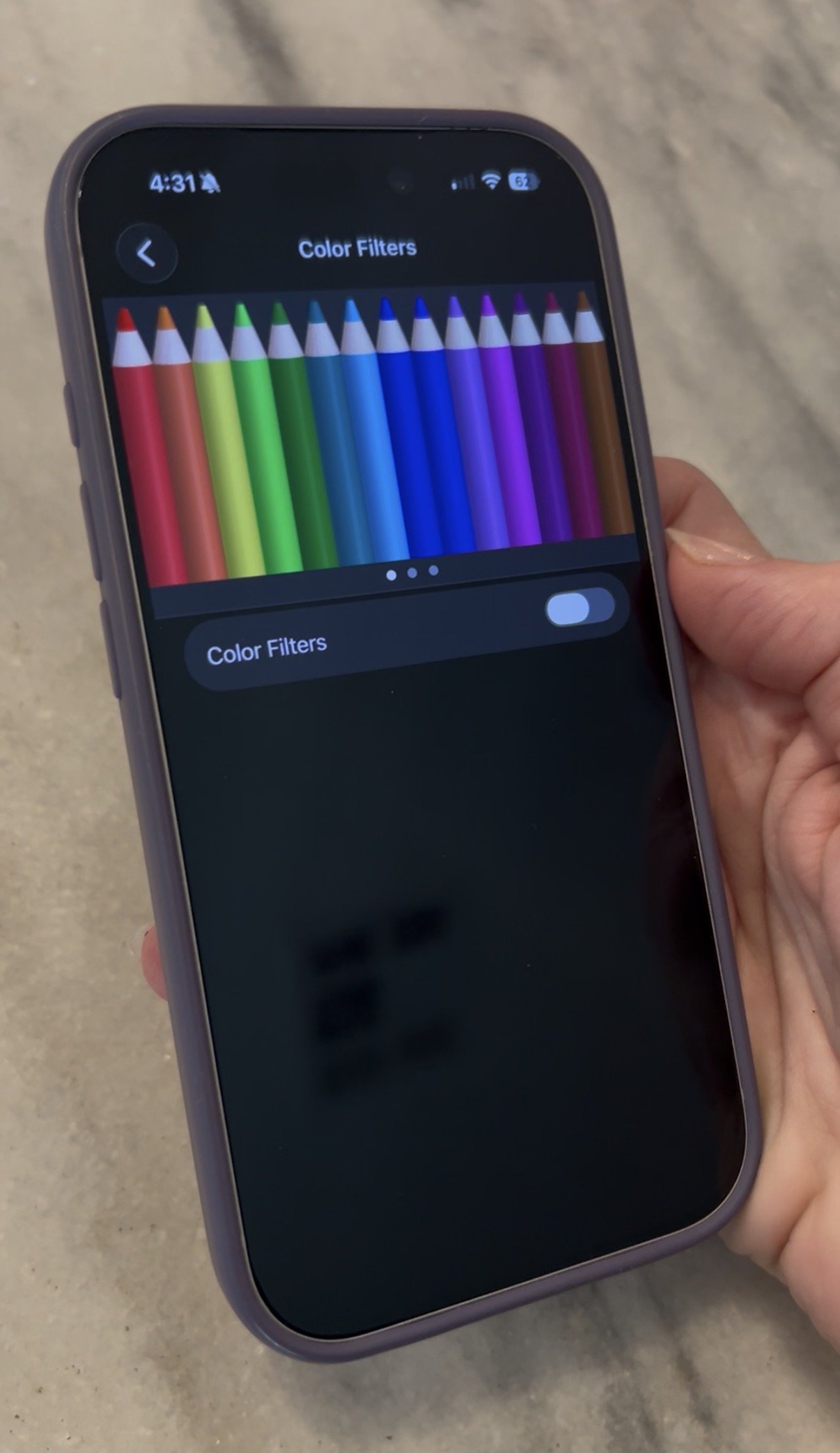
Below are examples of what the phone looks like without this filter turned on, and after. While you may not want to use it when looking at photos, you’d be amazed how it can help when looking at texts, emails, apps and more.

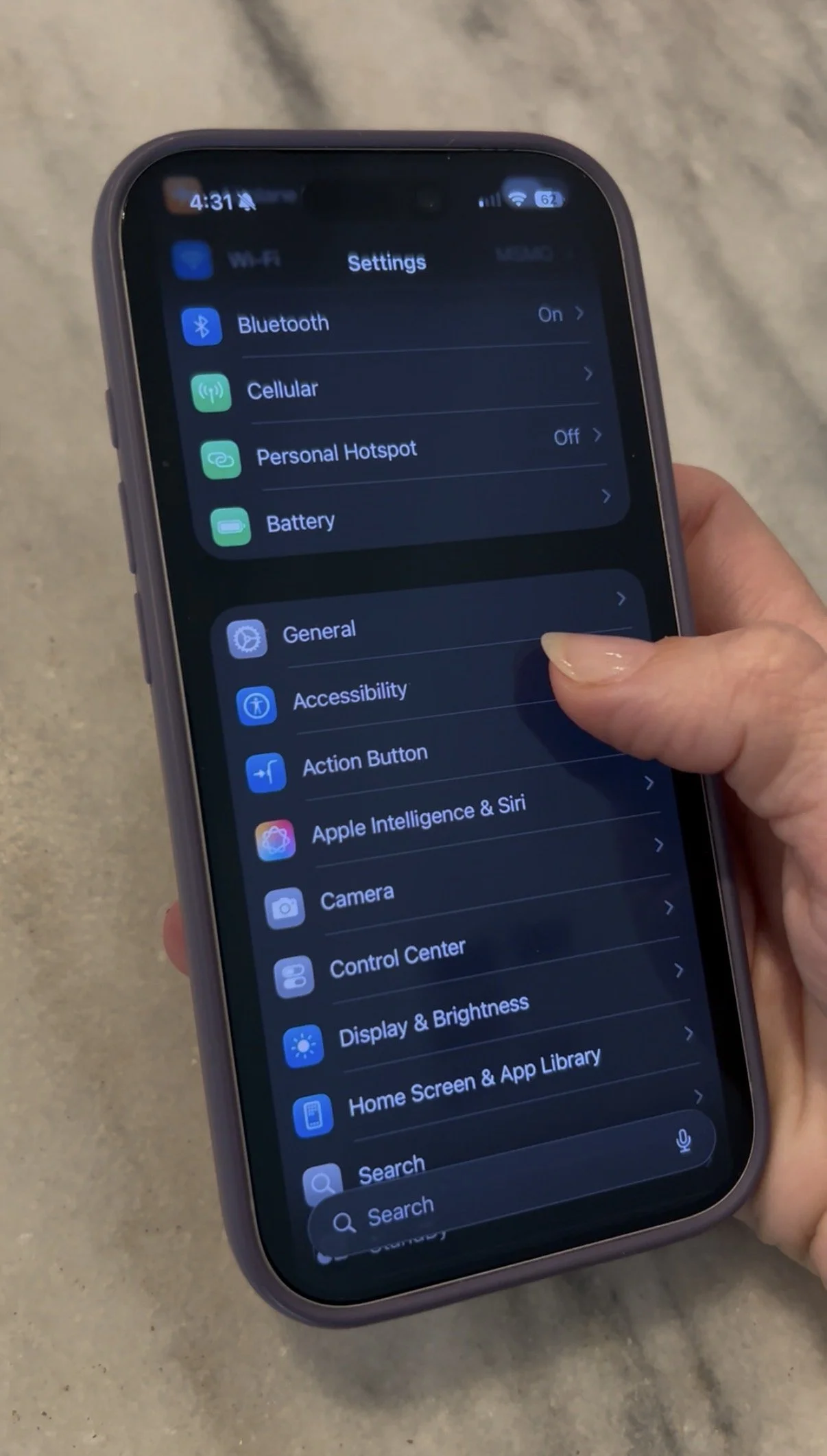
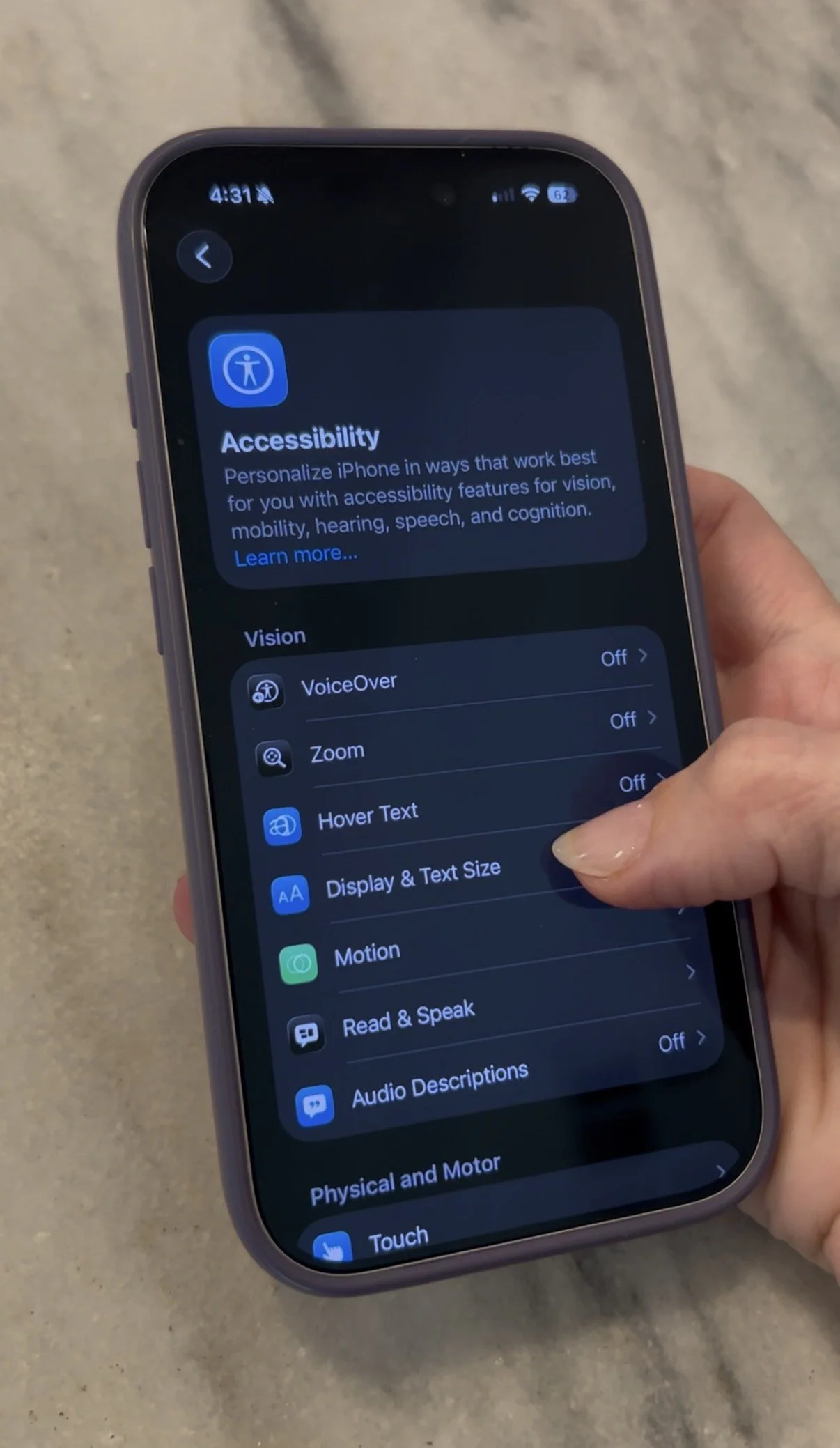
Turning this filter on is easy. First:

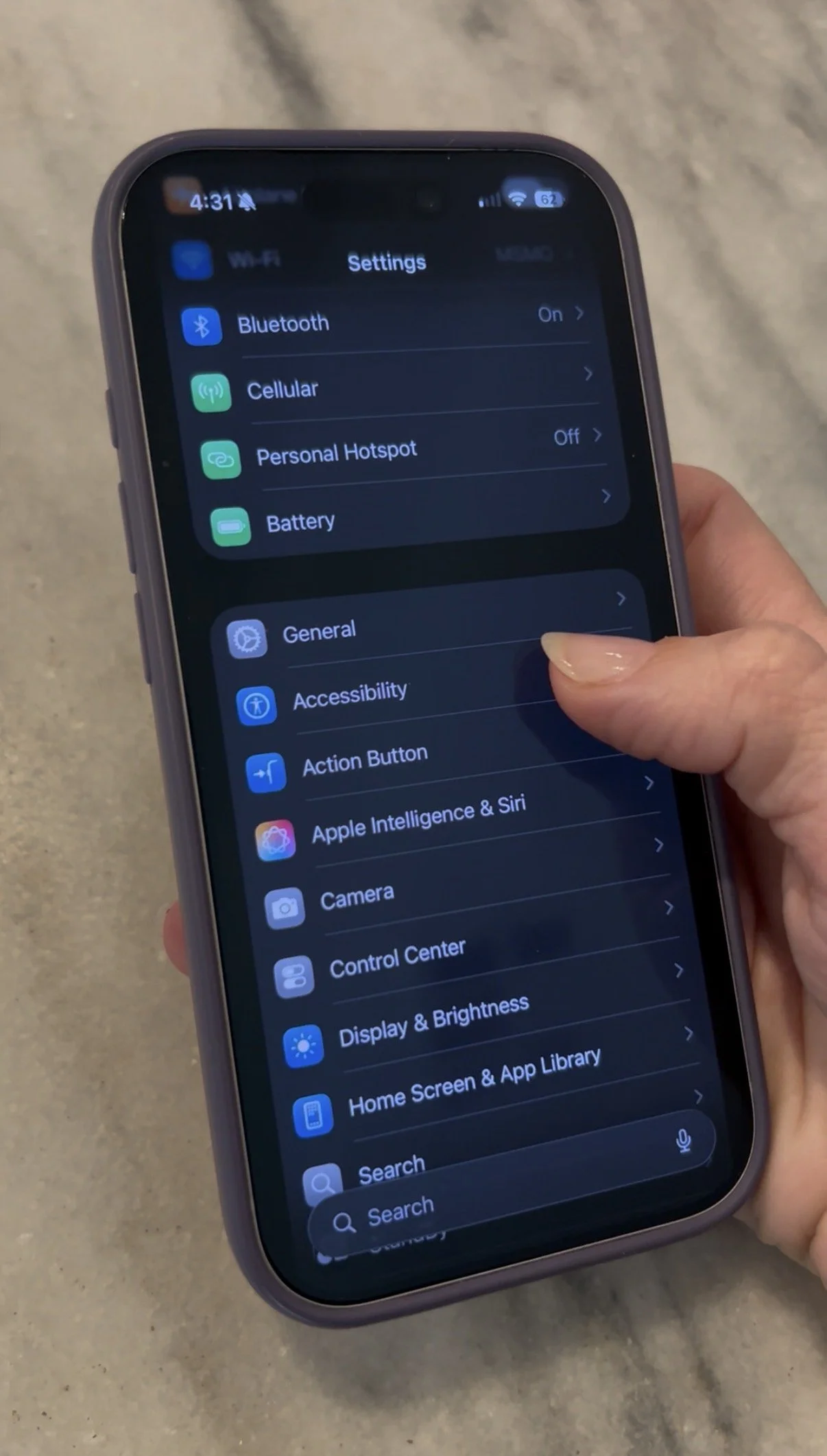
  • Go into Settings

  • Tap Accessibility

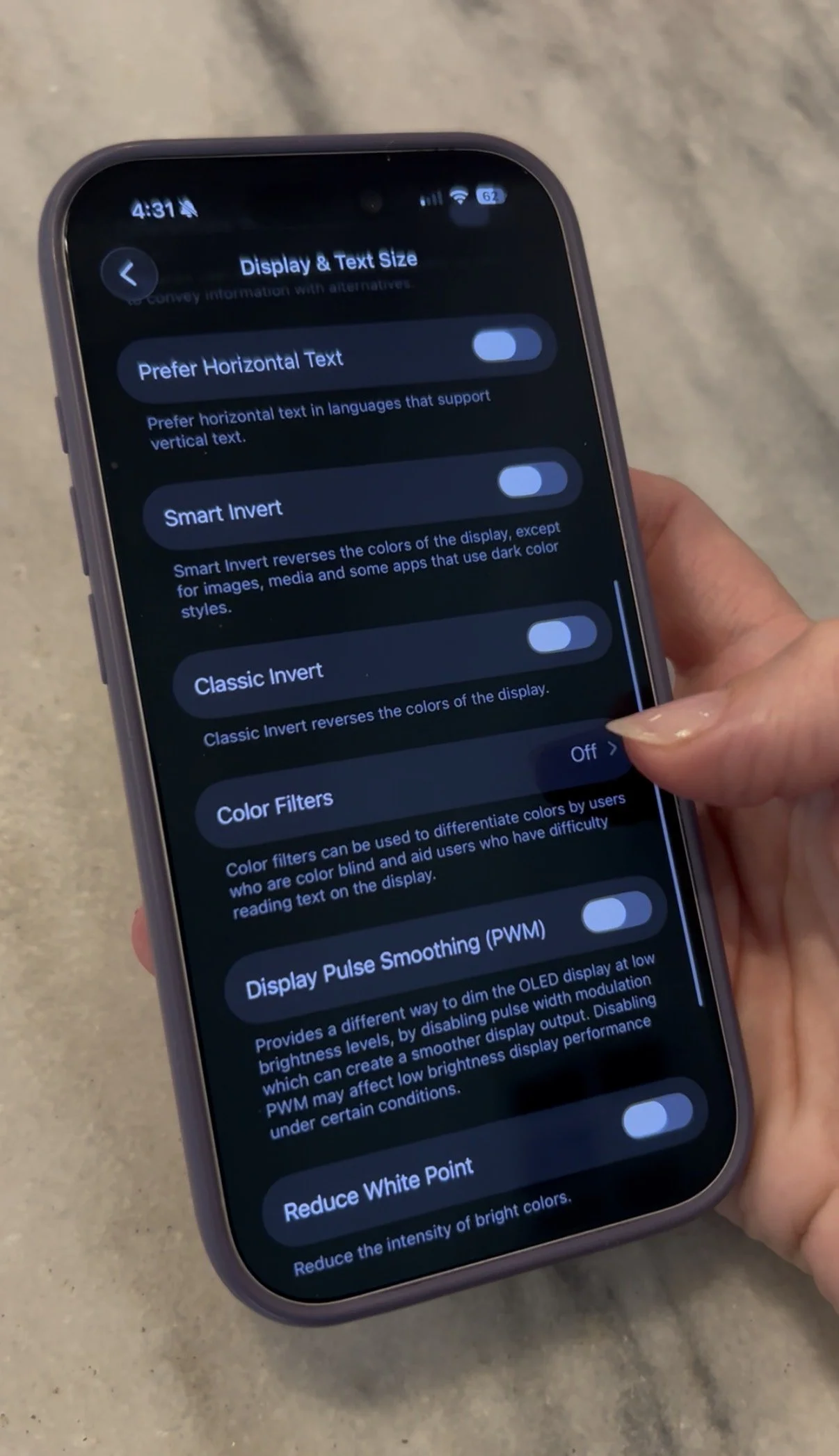
  • Tap Display & Text Size

  • Tap Color Filters

  • Toggle ON. You will see that you screen turns from full color to grayscale.

Want to use this feature, but not have to do the above step every time to turn it off? I’ve got you covered.

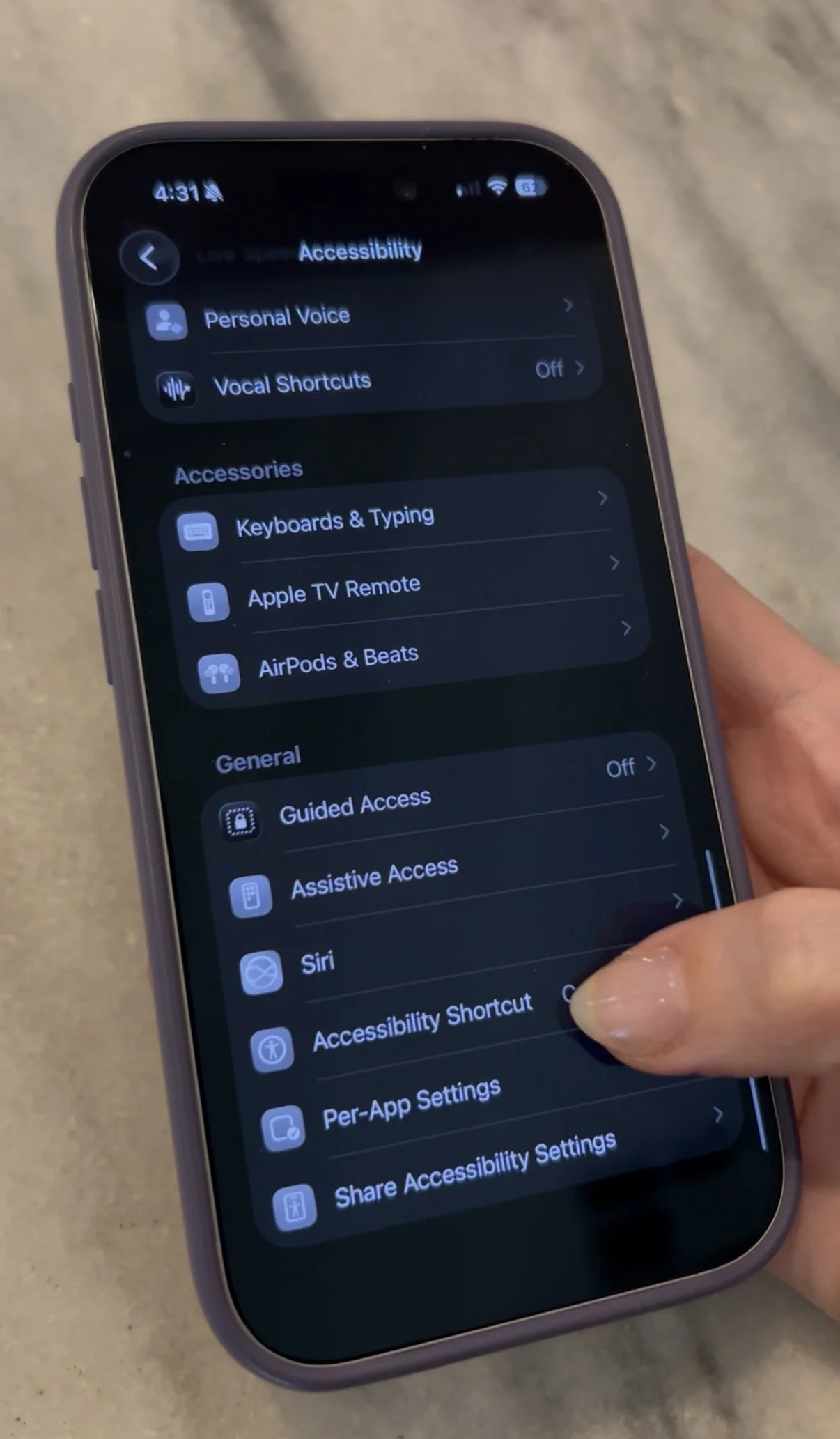
  • Go to Settings

  • Tap Accessibility

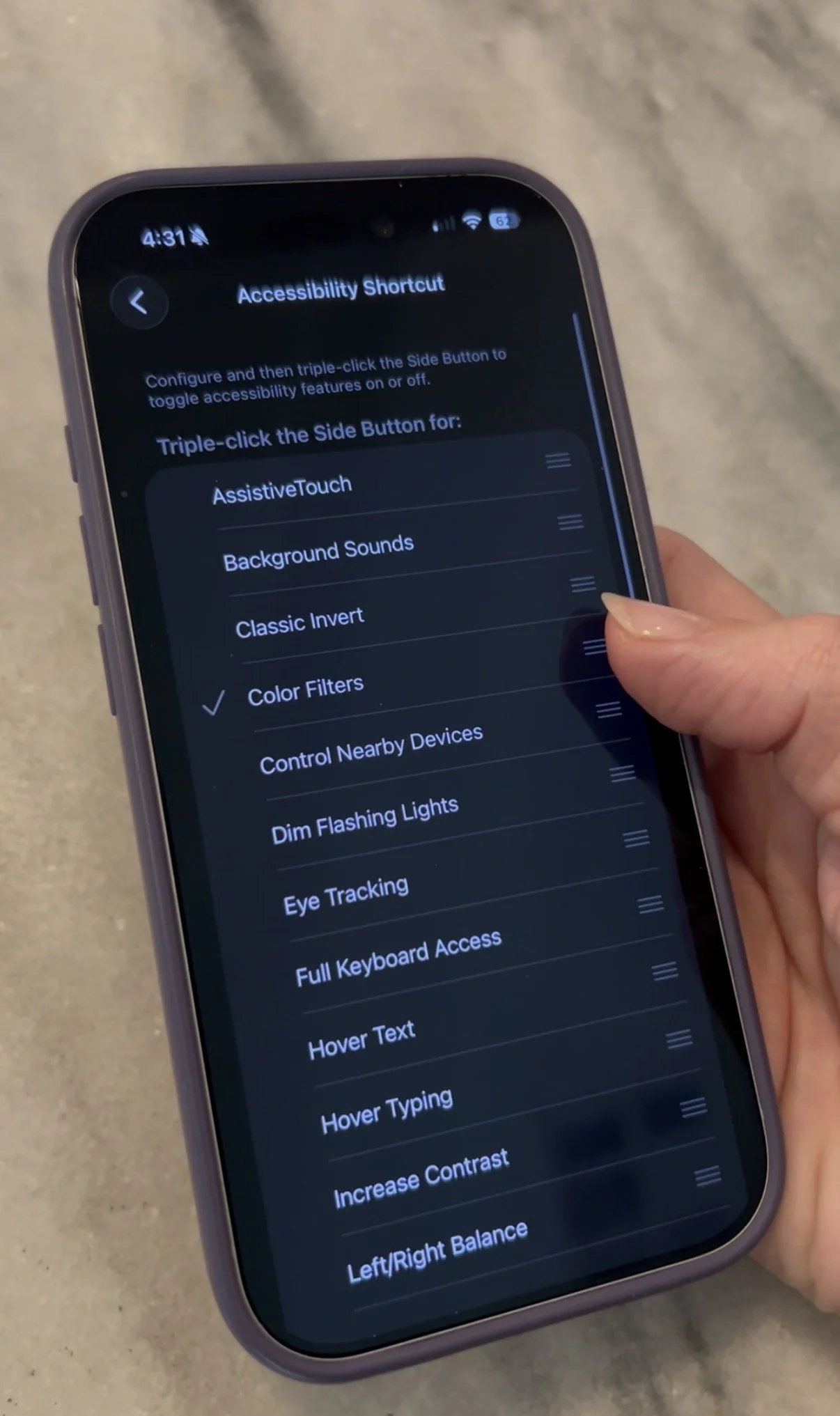
  • Scroll all the way down and tap Accessibility Shortcut

  • Tap Color Filters. When you see a checkmark next to it, you’re good to go.

From now on, you’ll simply have to triple-click the side button on your iPhone and you can toggle in between full color and grayscale.

Living in the digital age, it’s easier than ever to feel overstimulated. I hope this tip can help - even just a little bit!

My Top Tips for Traveling With Young Kids

I’ve traveled close to 50k miles solo with my kids over the last two years, starting when my daughter was 4 weeks old. My son, who just turned 6, has flown around 100k miles (!) after taking his flight when he was 3 months old. Being married to a professional baseball player, travel has become second nature to all of us - from one city to the next, wherever he was playing, we’ve traveled everywhere from New York, to Oklahoma, to South Korea!

Because of that, travel has become second nature to all of us. I’ve been through more travel situations that you can imagine (good and bad), and I love sharing my experiences in hopes that I can encourage other families to travel, even when it seems overwhelming. From delays in the airport to the sweetest flight attendants on the planet, we’ve experienced just about everything.

We just got back from 10 days in Europe as a family. Midway through the flight from PHX to Paris, a cat got loose and started wandering around the plane. My son is allergic to cats, which we proceeded to find out on that flight. It made for an eventful travel day, to say the least - but it was one of the best trips ever. We are all already planning when we can go back.

No matter what happens, with the right prep, everyone can enjoy! Here are my current top tips for traveling with younger children.

MINDSET

First and foremost, mindset matters. Traveling with kids is not always easy - there may be delays, there may be frustrations and they may have a hard time being off of their schedules. I go into every trip knowing that even if the travel day doesn’t go as smoothly as possible, being on the plane is a finite amount of time and that all I can do is my best to keep everyone comfortable and contained until we reach our destination. And, even if your kids have a hard time, flight attendants and even fellow passengers tend to be supportive, as long as your kid isn’t relentlessly kicking their seat or being disruptive without the parent trying to remedy the situation. Many of them have kids and understand, and those who don’t can wear their headphones, tune out and watch a movie 🙂

Even after the longest (hardest) of travel days, I have never once regretted the trip. The more I travel, the more I’ve learned how to simplify the process, so here are some of my current favorite tips.

SIGN YOUR CHILDREN UP FOR AIRLINE LOYALTY PROGRAMS

Sign your kids up for frequent flyer programs. If they have their own seat, they bank the points - no matter how old they are! Here are direct links to do so with the major domestic carriers. Add your child’s birthday and then simply confirm that you are the child’s parent or legal guardian and are setting up the account on their behalf. 

I created email addresses for my kids for things like this, but you can use any email address you want. The miles on some airlines (like Delta) never expire, and miles on other airlines (like American) don’t expire IF the member travels within a defined period of time (like every two years). 

https://www.delta.com/joinskymiles/ 

https://www.aa.com/loyalty/enrollment/enroll

https://www.southwest.com/loyalty/enroll

https://www.united.com/en/us/fly/mileageplus.html

PACK EARLY, TWEAK AS NEEDED

Start packing early. I lay out suitcases around a week in advance. It helps me not feel rushed, and I can go little by little when it comes to my checklist and pack whenever I have the ability to. Will there be a change in climate? If so, destination clothes are packed first, since they’re already not wearing them at home. Underwear and socks go last so they’re not sitting in the suitcase when they need to be worn prior. 

Charge devices the night before and then turn them off and pack them in their respective bags/backpacks. This includes tablets and headphones. 

I tend to stay away from packing lists, since it depends on the destination - however some things are brought no matter what.

MY TRAVEL MUST-HAVES:

A LIGHT, FOLDABLE STROLLER. I travel with one that folds under the plane seat or in the overhead bin and is easy to fold down and carry up and down stairs or on public transportation. We have the gb Pockit+ All Terrain, and just recently purchased a Stokke Babyzen YoYo which is sturdy and has a little more storage, but is a splurge. The canopy also goes down a little further if your child will sleep in a stroller. 

ZIPLOCK BAGS. You’d be shocked at how many things I use these for during travel. I put trash in them on the airplane so the trash isn’t falling on the floor or getting shoved in the seatback pocket. I’ve used them for snacks (or half-eaten snacks), toys, pacifiers and more.

TRAVEL DISH SOAP. Handy for so many things, including a water bottle or pacifier that falls on the ground on a plane. You can also get wipes that work in a pinch. 

EYE MASK HEADPHONES

EYE MASK HEADPHONES. My daughter is just now getting to the point where she will sit still and watch a show on a plane, and when searching for headphones for her age, I came across these headband headphones that double as an eye mask - and when she got tired enough, I put them on her and when she fell asleep, turned on background noise on my connected iPhone and pulled them over her eyes which helped her sleep a little longer with plane lights and sounds. I tried a few brands, but these had the best audio quality!

EXTRA CLOTHES. I pack an extra outfit for each kid, shoved to the bottom of the diaper bag. With a really young baby, you may want two extra onesies depending on the length of the trip.

 SMALL FIRST AID KIT. A few bandaids with a small tube of ointment, some Motrin, any medications they take, etc. Always pack this in a carry-on in case checked bags get lost. 

LOLLIPOPS. Helpful for takeoff and landing or just for a little treat when they get restless. I like YUMEARTH, but I also like Beekeepers Naturals which include propolis, vitamin D, zinc and wildflower honey. 

 DISINFECTANT WIPES. I carry travel packs and wipe every tray table, armrest and headrest down before my kids settle in. Whatever I can wipe, I wipe it - and I also wipe their hands a lot, even just with baby wipes. These BoogieWipes are alcohol-free, or if you’re comfortable using Clorox or a stronger disinfectant, those come in travel packs as well. 

NOZIN NOSE SANITIZER. Always ask your doctor before using a product like this, however this product has been clinically proven to lessen the risk of infection and has been helpful to travelers when used before a flight. It’s essentially hand sanitizer for your nose and I learned about it after a friend was recommended to use it by a physician.

ADDALOCK. This is a portable door lock that works on most doors, including in hotels. It adds a layer of security and gives me peace of mind. 

JETKIDS BY STOKKE. This is a ride on piece of small luggage that converts any airline seat into a bed, or adds a leg rest. It has been huge for us - my 6 year old can ride it through the airport, and then we use it to extend the seat for my very busy daughter. It also has extra storage for blankets, snacks, toys, or whatever. Just make sure to check with the airline before you travel - we’ve had no issues using it domestically, but it was NOT allowed on our flights to Europe on Air France (nothing that extended seat space was).

CAR SEATS. You can check car seats for free on most airlines. When I bring them, I put them in this car seat bag which fits both my son’s booster and my daughter’s travel car seat (the Cosco Scenera Next). We’ve also used the Doona, the WayB Pico and the RideSafer Vest depending on the age of my child and the location we’re traveling to. Most of the options we use are also FAA approved for use on the airline, as well. 

If you don’t want to bring car seats, car rental companies many times have them available to rent, or you can hire a car service that can have them previously installed. 

SLEEP SCHEDULES

This next tip is a little controversial, but it has worked for us when flying internationally. I adopted it when my son slept for 30 minutes total during a 17 hour travel day to South Korea - but then went to sleep and slept all night on Korean time as soon as we got to our apartment at 11pm. With the exception of overnight times on the flight or a catnap during the day, we try to avoid letting our kids take long naps during the day when we arrive at our destination. On our recent trip to Europe, our destination was 9 hours ahead. We landed at 10am (1am our home time), they’d each slept for maybe an hour on the flight. They fell asleep for 10 minutes in the car on the way to our rental around 1pm, and then we kept them outside in the sunlight and stimulated until it was bedtime local time. 

To make sleeping at the destination a little easier, we try to keep a sleep setup reminiscent of home. We bring a Slumberpod and stuffed animals for my daughter and a blackout stick up curtain and stuffed animals for my son - as well as their Hatch noise machines. With a dark environment, stuffies and the noise they’re used to sleeping with, they tend to feel more comfortable in their sleep space. When possible, we request a crib or travel crib from the hotel or wherever we are staying - but I’ve used the Guava Lotus travel crib with both kids, and it’s my favorite. Easy to put up and take down, and slightly longer than traditional travel cribs. My son slept in it on the road until he was 3 - and he’s in the 90th percentile for height.

CONCLUSION:

While this is certainly not an exhaustive list, nor is traveling with children a one size fits all situation, I hope that it has given you an idea or two when it comes to ways to make your travel a little easier! The memories made at your destination are sure to upstage the memories of the travel there.

What are some of your favorite travel tips? Let me know in the comments! Happy travels!

Clean Up Your Photos with the iPhone's 'Clean Up' Feature

How many times have you taken a picture that you love, only to wish that someone or something wasn’t diminishing the shot by being in the background? While I love being creative, photo editing is not one of my specialties (though I wish that it was). So, I was happy to find out that Apple had added this Clean Up feature to the Photos app and made it extremely beginner friendly to use.

Check out this photo of my family in Paris last week, at the famous Arc du Triomphe. As expected, we were not the only people there - there were plenty of tourists behind us in the only photo that we got in which my daughter wasn’t flailing around!

My family - and other visitors - at the Arc du Triomphe in Paris

Enter: the Clean Up feature. It works on photos taken on your iPhone, and on other devices or cameras, as well! Let me show you how it works!

First, go into the photo you want to edit in your photo library. Click the three lines at the bottom to open the edit options.

Three lines at the bottom of the photo, bringing up the edit menu

After you click the three lines, you’ll see Clean Up in the bottom right corner.

Click the Clean Up button on the right!

From there, the iPhone will automatically detect things in the back of your photo that it thinks you may want to remove. You’ll see them flash. Simply tap with your finger, and the iPhone will do it’s best to remove them. You can also drag your finger over any items it may have missed, and it will try and remove those, too!

Things the iPhone can remove flashing in the background

If it removes something and you don’t like how it looks, hit the arrow in the upper corner to undo.

Then, hit “Done!” Look at the before and after. Only takes 1-2 minutes, and voila!

BEFORE USING THE CLEAN UP FEATURE

AFTER THE CLEAN UP FEATURE

Want to see this explanation in video form? Check out my reel on Instagram.

It’s not always perfect, but sometimes it makes a big difference! Happy editing!

Social Media & Young Minds: A Few Things to Consider

This blog was originally written for and posted on Techronicler.

As you may have heard, the Australian government recently introduced a bill to ban children under the age of 16 from using social media. While government involvement is a completely different topic, and I can not speak to the specifics of the bill, I do think it’s important to discuss the potential impact that social media can have on young minds.

As a former Google employee and mom of two who has worked in the tech industry for almost two decades, I am very passionate about protecting our children in the digital age. I feel strongly that although there are exceptions, such as accounts run by parents for work purposes (an example would be a young professional athlete or public figure), most children should not have access to social media accounts (and in many cases, other apps as well without direct parental supervision or strict parental controls).

I also feel as though open parental communication and education is key here. The internet is vast, and children are curious - cultivating an environment in which the child can ask questions can be essential.

Social media is made up of complex algorithms that help determine what the user will be shown - and the algorithms are specifically designed to keep a user on the app as long as possible. The content that I see on my timeline may be very different than the content that you see, as timelines are made up of posts that the algorithm has deemed will be the the most likely to keep an individual user engaged and scrolling.

The more time that you spend on the app, the more money is made - so a "one size fits all" approach is simply not effective from a business standpoint. The documentary "The Social Dilemma" breaks it down pretty well, and gives examples of what the app does to essentially get a user addicted to it - from tweaking the content that you see to sending you notifications suggesting you come back and check out what's new. It also shows specific scenarios in the lives of young people. It is available to watch on Netflix.

Let's say a curious young person searches for something that most adults would deem inappropriate, and then scrolls through and reads about it. The algorithm now sees that the topic the user searched for was of interest, and will deliver more content of the sort. You may have noticed this on your own timelines.

Your child may be ingesting information that is not only dangerous, but completely false - being delivered from fake accounts with ulterior motives, people disguising themselves as someone else, and so much more. On top of a chemical change in the brain when it is being served content of interest, which I will touch on next, younger brains also have a harder time distinguishing fact from fiction, and many times a harder time being able to brush off negative or dangerous content or messages.

Seeing content that we're interested in prompts a physical change in our brain, activating the brain's reward center - keeping the user refreshing and/or scrolling to see what's new. Because of the dopamine spikes that social media usage can provide, many adults have a hard time putting their phones down sometimes (myself included). Now, consider the impact that this can have on a developing brain.

Not only can this cause shortened attention spans when asked to participate in important activities that cause less of a dopamine spike (including schoolwork, reading, family time and playing with toys), the targeted information provided to the user perpetuates the cycle of wanting more, more, more. This can lead to difficulty concentrating, increased anxiety, sleep issues and more.

There is also growing evidence that mental health issues in teenagers are on the rise, and could very well be correlated with social media use. This can be due to a plethora of reasons - from unrealistic beauty standards and filters on social media that teens are comparing themselves to, to the ongoing desire for validation through posts and likes - and cyberbullying can be extraordinarily dangerous for vulnerable teens, as well. Here's an article from Yale on the subject.

The main argument I've heard in favor of social media, understandably so, is that social media is a way to connect and socialize and not having access removes the child from a key part of socialization. While I completely agree that socializing is imperative, there are other ways for young adults to be digitally included without having social media accounts. These can range from having a non-smart phone for calls and texts to having a monitored phone with limited apps. Privacy and independence are important for teens - safety is even more important. All it takes is one post or message to cause significant damage to a child or teen's mental health, or worse.

Making sure your child is ready for the world you're opening them up to is essential. When deciding if your child is old enough and mature enough for social media, it’s important to consider if they truly understand things like the fact that a post, even if deleted, can potentially live on forever. And that just because a profile looks legitimate upon first glance, doesn’t mean that it is.

I saw a quote once that said something like, "when you want your child's childhood to end, give them a smartphone." So my question is this. If you do hold off on social media for your child, what's the worst that could happen?

Technology is ever changing, and the digital landscape just keeps growing and growing. It’s our job as parents to keep the communication flowing, and our eyes open to the vast world that our kids will eventually be exposed to.